
Note: a virtual machine (VM) created on an Intel-based Mac cannot be started on a Mac computer with M1 chip. A new VM on a Mac with Apple M1 chip must be created (see KB 125375). However, you can transfer your data from the original VM as per KB 125344.
Symptoms
I need to transfer an existing virtual machine to your new Mac.
Resolution
When you buy a new Mac, you do not have to install your virtual machine once again - you can just transfer an existing one.
Important: Shut down your virtual machine before following the steps below.
Note: Once the virtual machine is transferred to another Mac, you might get the following notification:
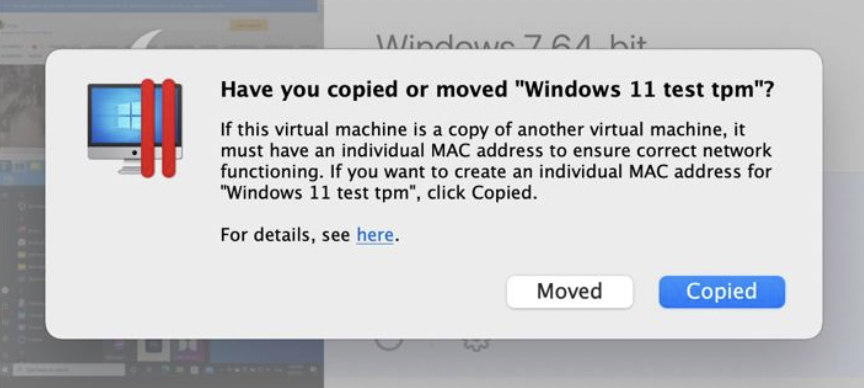
The difference is that when you select the Moved option the parameters of the virtual machine won't be changed.
If you select the Copied option please consider the following parameters of the virtual machine will be adjusted:
- UUID of the virtual machine;
- MAC address of the network adapter.
-
Locate the virtual machine on your old Mac hard drive.
Note: in order to transfer a Boot Camp partition, see KB 113658
By default, virtual machine files are located either in Documents/Parallels folder inside your user folder, or in /Users/Shared/Parallels.
Parallels Desktop virtual machines have a .pvm extension

- Copy the .pvm file to an external hard drive or transfer it via the network.
- Connect your external hard drive to the destination Mac.
-
Copy .pvm file from the external Hard Drive to any folder on the destination Mac.
You can disconnect the external device now that your virtual machine has been successfully moved to your Mac.
- Install Parallels Desktop, then double-click on the .pvm file on your Mac to start the virtual machine.
Note: OS X does not support writing to NTFS partitions by default. We recommend formatting your external drive to either OS X native HFS+ file system or ExFAT file system (for compatibility with Windows PCs).
Note: FAT32 file system does not support files bigger than 4 GB.
Was this article helpful?
Tell us how we can improve it.