
Parallels is aware of recently published security advisories affecting a third-party component used by the Parallels RAS User Portal. Some security scanners may flag RAS Secure Gateway servers as a result of these advisories.
Our engineering team has made this issue a top priority and is actively working on an updated build. Security fixes are prioritized above all other development work, and the update is being validated as quickly as possible to ensure it is delivered safely and without regressions.
Current status
- The issue has been confirmed and is under active development and testing.
- Updated builds will be made available for supported Parallels RAS versions.
- This article will be updated as soon as updated builds are released.
No action is required from customers who do not use the User Portal. Customers who need to reduce exposure before the update is available can use the temporary mitigation below.
Temporary mitigation: disable the User Portal
The Parallels Client is not affected. If your users can connect with the Parallels Client, you can disable the User Portal on your RAS Secure Gateways until the update is installed.
- In the RAS Console, go to Farm > <Site> > Secure Gateways.
- Right-click a Secure Gateway and select Properties.
- Open the User Portal tab.
- If Inherit default settings is selected, clear it.
- Clear Enable User Portal.
- Click OK, then click Apply in the RAS Console.
- Repeat these steps for every Secure Gateway in the Farm.
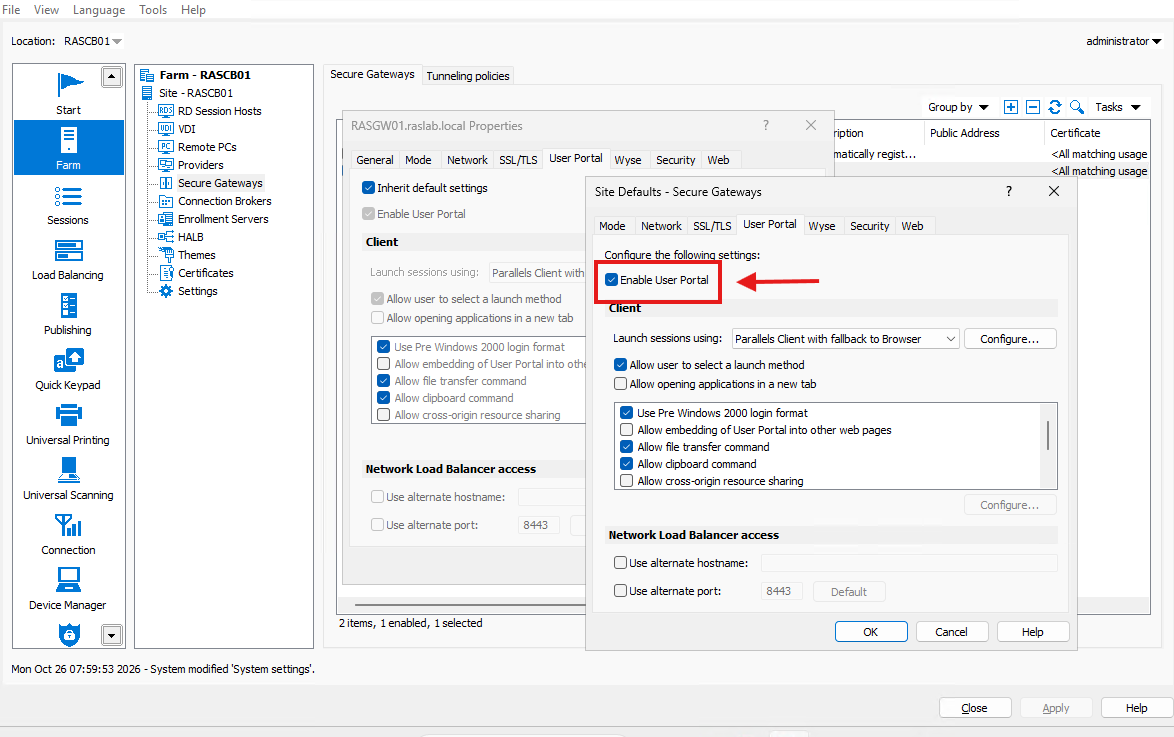
Note: The User Portal tab is available only when the Secure Gateway is in Normal mode.
Important: While the User Portal is disabled, users cannot connect from a web browser. Users must connect with the Parallels Client.
How to re-enable the User Portal
After you install the updated build, re-enable the User Portal on each Secure Gateway. Select Enable User Portal again, or select Inherit default settings if the gateway used the Site defaults before.
For more information, see Enable or disable User Portal in the Parallels RAS Administrator's Guide.
Was this article helpful?
Tell us how we can improve it.