
Target Audience
- IT professionals such as a server, network, and system administrators familiar with Microsoft SQL Server environments
- Existing Parallels RAS administrators
Prerequisites
- Experience operating Parallels RAS farm, including RAS Reporting Services
- Experience querying databases using Transact-SQL or Microsoft SQL Server Management Studio
Note: Parallels RAS should be installed and configured with RAS Reporting component in order to utilize the steps described below.
In this article, we are going to create a report that displays applications used by each user and a number of application launches.
In order to create reports on your own, first download Microsoft SQL Server Report Builder:
Note: In order to avoid compatibility issues, we suggest using a version that corresponds to the version of Microsoft SQL Server edition.
Once it is installed, we can run it:

And create a new blank report:

Each report requires to have a data source, which can be configured using one of two approaches below. (Download illustrated steps by clicking on the links below.)
After configuring the data source we should also create a data set. (Scroll to the end of the article for an example of SQL Query and its explanation.)

Download the steps for Data Set configuration
Once a data set is configured, we may start populating the actual report.

Populate the table according to the fields that will be provided by Data Set SQL Statement:


Run it to see the report output.

Open Remote Application Server Console > Administration > Reporting > Tracking Settings

Enable Custom Reports and specify the folder name (or keep default name) for saving .rdl reports.

Click OK on Advanced Setting and Apply setting changes to RAS Console.
Once done, click Refresh and you should see a Custom Reports folder:

RAS Reporting Database tables
| Table | Description |
|---|---|
| ApplicationConnections | Contains names and IDs of applications used in sessions. Linked to the RDSessions table, which contains session information. |
| ComponentsConnections | Used together with the PublishingAgentConnections table. When a machine is connected, it is connected to a Connection Broker; this table links a machine to that Connection Broker. |
| DBUpgradeHistory | Contains all upgrade versions of the database. |
| Devices | Contains information about devices used to connect to RAS. |
| DisconnectErrors | Contains disconnection IDs and their corresponding error descriptions. |
| Disconnections | Contains the disconnected time of every connection. |
| DiskOptimization | Holds information related to disk changes for disk-optimized disks. |
| DiskReadHealth | Stores current disk-read usage, marked by a timestamp. See the queries section for how to query this table. |
| DiskWriteHealth | Stores current disk-write usage, marked by a timestamp. See the queries section for how to query this table. |
| EnrollmentServers | Contains all enrollment servers. |
| Farms | Contains the farm information. |
| Gateways | Linked to the GatewayTypes table; shows all gateways and their types. |
| GatewayTunnelledConnections | Linked to the Gateways table; shows the number of connections going through each gateway. |
| GatewayTypes | Contains gateway types (Normal, Forwarding, Unknown). |
| Groups | Contains all groups. |
| Guests | Records which guests are connected and which VDI they belong to. Not used in any queries. |
| HostPoolActions | Records actions performed on a host or host pool, such as a host being added, removed, powered on, or powered off. |
| HostPools | Contains host pool information. |
| HostTypes | Contains the host types used in the VDIHost table. |
| IdleConnections | Contains the idle time of every connection. |
| LogonDetails | Contains details recorded when a session logs on. |
| Machines | Stores information about all servers connected to the farm, including Terminal Servers (TS), Connection Brokers (PA), Secure Gateways (GW), RemotePCs (RPC), VDI hosts (VDIH), and VDI Guests (VDIG). |
| MachineStateLogs | Records the different states a machine has been in. See MachineStates for the full list of states. |
| MachineStates | Contains all machine states used in the MachineStateLogs table. |
| MachineType | Contains the machine types used in the Machines table. |
| Members | Used together with the Groups and Users tables to show which users belong to which groups. |
| MemoryHealth | Stores current server memory usage, marked by a timestamp. See the queries section for how to query this table. |
| Notifications | Contains notifications raised in the RAS Console. |
| ProcessorHealth | Stores current server processor usage, marked by a timestamp. See the queries section for how to query this table. |
| Protocols | Contains the protocols used in the RDSessions table. |
| PublishingAgentConnections | Logs how long a Connection Broker has been active. While active, the Started and Ended fields match; when a disconnect is received, the Ended field is set to the new timestamp. |
| RDConnections | Links to the RDSessions table. A session can have multiple states; a connection must be established before the Disconnected and Idle states can apply, so those two tables relate to RDConnections. |
| RDSessions | Stores established sessions by client, including protocol used (Console or RDP), session type (Desktop, Published Apps, VDI Apps), the user (all users are pre-populated in the table), and start/end time. |
| RemotePC | Placeholder table with no columns other than the primary key. |
| SDBandwidthAvail | Contains bandwidth-availability details for a session. Default retention: 4 weeks. |
| SDBandwidthAvailRange | Contains the value ranges for bandwidth availability. |
| SDConnQuality | Contains connection-quality details for a session. Default retention: 4 weeks. |
| SDConnQualityRange | Contains the value ranges for connection quality (Poor, Fair, Good, Excellent). |
| SDEvaluator | Contains UX Evaluator details for a session. Default retention: 4 weeks. |
| SDEvaluatorRange | Contains the value ranges for UX Evaluator scores. |
| SDLatency | Contains latency details for a session. Default retention: 4 weeks. |
| SDLatencyRange | Contains the value ranges for latency. |
| SDTransPotocol | Contains transport-protocol details for a session. Default retention: 4 weeks. |
| SDTransPotocolRange | Contains the value ranges for transport protocol (TCP, UDP). |
| SessionTypes | Contains the session types used in the RDSessions table. |
| Sites | Contains each site in the farm. |
| TerminalServers | Placeholder table with no columns other than the primary key. |
| TimeZones | Contains all time zones. |
| UserExperience | Contains user-experience details for a session, such as reconnects, reconnects (CIR), and disconnect reasons. Default retention: 4 weeks. |
| UserProfileTypes | Contains the user profile types (UPD, FSLogix, Others). |
| Users | Contains all logged-in users. |
| VDIHost | Records the VDI host type. Not used in any queries. |
See the RAS Reporting database schema.
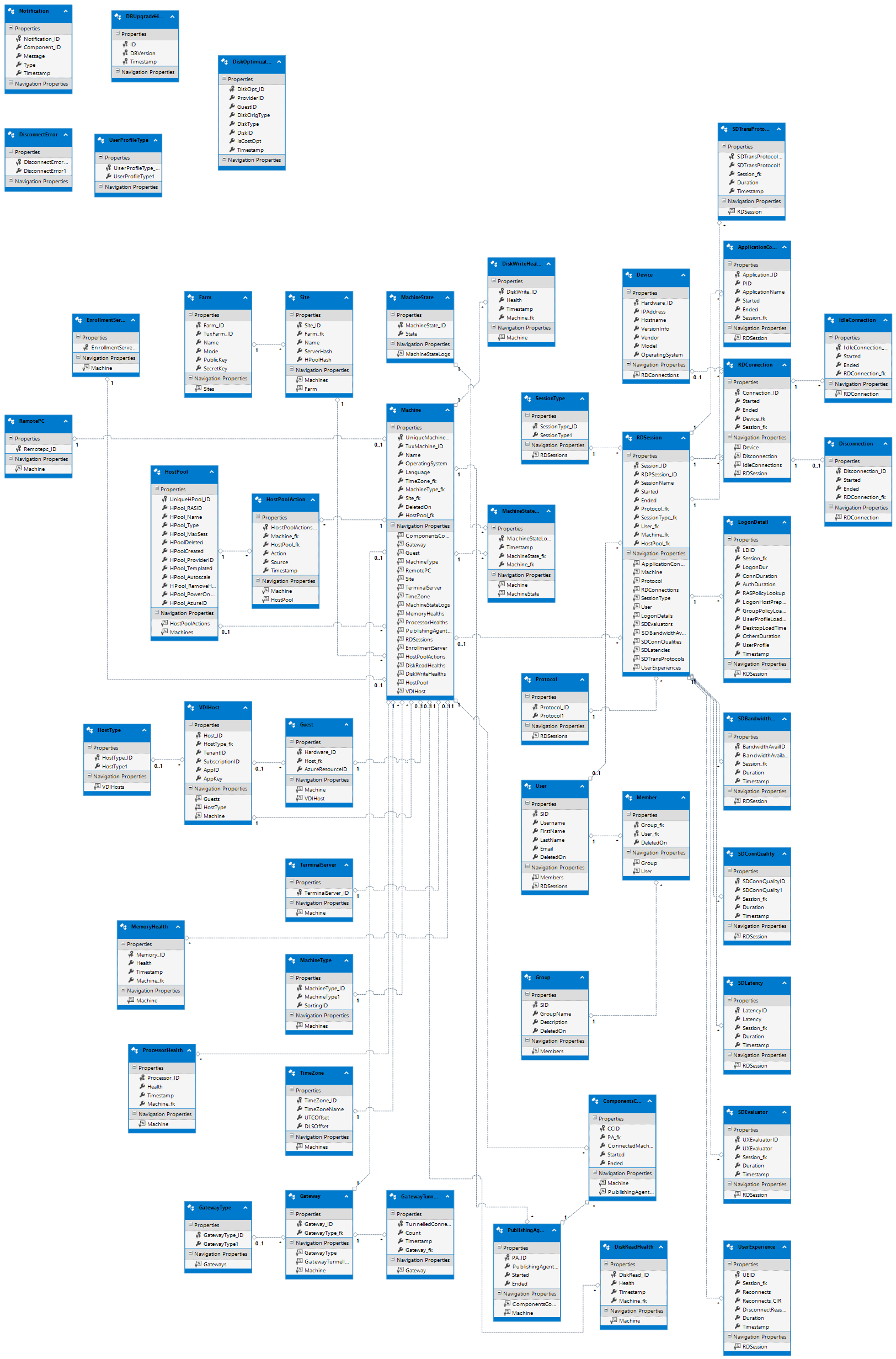 Please check Navigation Properties for each table in order to clarify which tables it is linked to.
SQL Query example:
SELECTus.Username, ac.ApplicationName AS [Application Name], COUNT(ac.ApplicationName) AS [NumOf Times Used]FROM dbo.Users us INNER JOINdbo.RDSessions rd ON us.SID = rd.User_fk INNER JOINdbo.ApplicationConnections ac ON ac.Session_fk = rd.Session_IDGROUP BY us.Username, ac.ApplicationName
Referring to the database schema and SQL query itself, you may find that the following is being performed:
-
Select usernames from table dbo.Users and gives "us" alias to the table.
-
Since dbo.Users table does not have link to dbo.ApplicationConnections, it should first join table dbo.RDSessions using matches on field SID from dbo.Users and User_fk from dbo.RDSessions
-
After we have joined dbo.RDSessions (alias "rd") which has a link to dbo.ApplicationConnections, we may also join ApplicationConnections itself with alias "ac" and select Application names and number of launches from it.
Was this article helpful?
Tell us how we can improve it.