
Overview
In October 2026, Node.js published security updates, including a fix for CVE-2026-111497 in its bundled Brotli data-compression component. Parallels RAS uses Node.js in the RAS User Portal on the Secure Gateway. Because of this, some security scanners may flag RAS Secure Gateway servers. Many vendors are issuing updates for this component, not only Parallels.
Our engineering team has reviewed the issue. RAS does not use the affected Brotli decoder directly, and we have not identified a direct exposure. We are not aware of any customer being affected by an exploit. As a precaution, and to make sure the latest security patches are applied, we are updating the Node.js component in all supported versions.
Current status
We are releasing the updates in phases:
| Version | Scope | Status |
|---|---|---|
| RAS 21.2 (current GA) | Node.js component updated to 24.22.1. | Available — Parallels RAS Core v21.2.2.1-27432 (26 October 2026) |
| RAS 20.2 | Node.js component update. | In progress — hotfix expected shortly |
| RAS 22.0 | Updated Node.js component. | Included in the 22.0 release |
This article will be updated as each build is released.
Recommended action
- RAS 21.2: install version
v21.2.2.1-27432or later. Download it from Parallels RAS download links. For the full list of changes, see KB 131037. - RAS 20.2: install the hotfix for your version once it is available.
- Older, unsupported versions: we recommend that you upgrade to a supported version.
No other action is required in the meantime.
Optional: additional precaution until you can update
This step is not required. If you want an extra precaution before you install the update, for example on an older version, you can temporarily disable the User Portal on your RAS Secure Gateways. This precaution applies only to the User Portal. The Parallels Client is not affected, so users can keep connecting with it.
- In the RAS Console, go to Farm > <Site> > Secure Gateways.
- Right-click a Secure Gateway and select Properties.
- Open the User Portal tab.
- If Inherit default settings is selected, clear it.
- Clear Enable User Portal.
- Click OK, then click Apply in the RAS Console.
- Repeat these steps for every Secure Gateway in the Farm.
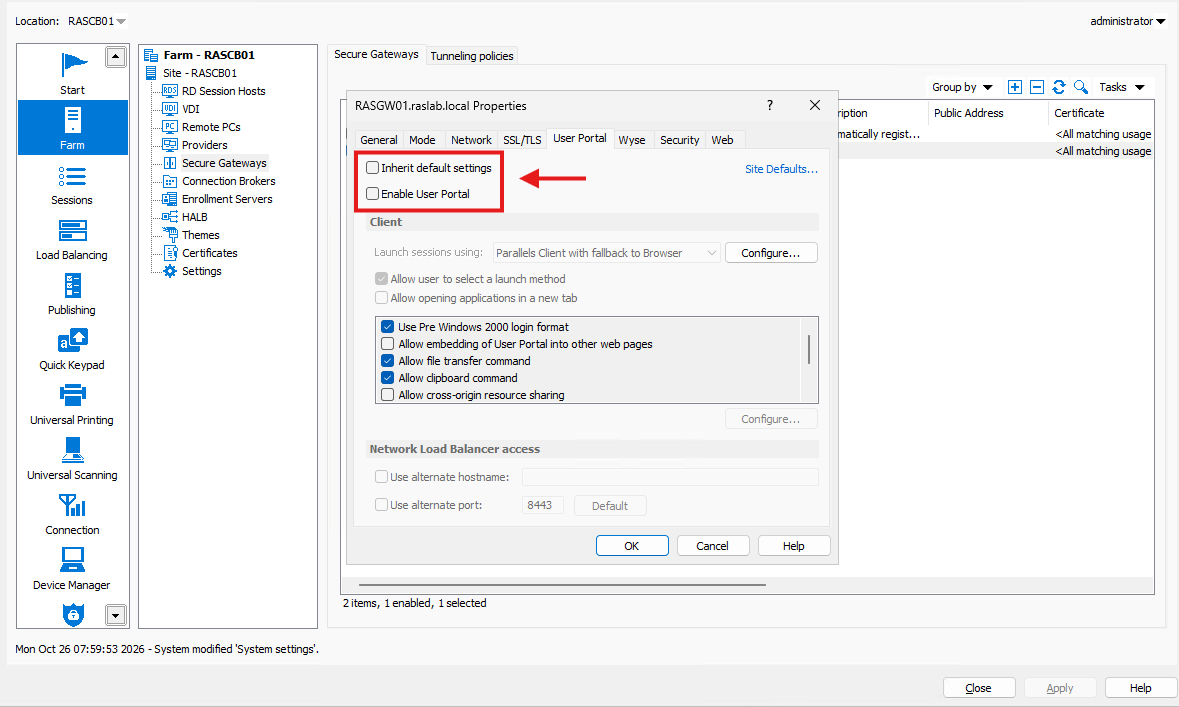
Note: The User Portal tab is available only when the Secure Gateway is in Normal mode.
Important: While the User Portal is disabled, users cannot connect from a web browser and must use the Parallels Client.
How to re-enable the User Portal
After you install the update, re-enable the User Portal on each Secure Gateway. Select Enable User Portal again, or select Inherit default settings if the gateway used the Site defaults before.
For more information, see Enable or disable User Portal in the Parallels RAS Administrator's Guide.
Was this article helpful?
Tell us how we can improve it.