
This article provides a detailed guide to configuring Parallels Remote Application Server Single Sign On using SAML 2.0, where user identities are managed in AWS Managed Microsoft Active Directory, and certificates are issued via Active Directory Certificate Services hosted on a Windows Server EC2 instance acting as an Enterprise Root Certification Authority.
This configuration enables secure, seamless authentication using a SAML Identity Provider integrated with Parallels RAS.
Architecture Overview
The solution relies on the interaction between several key components:
AWS Managed Microsoft Active Directory is deployed across multiple Availability Zones.
Enterprise Root Certification Authority hosted on a domain-joined EC2 Windows Server.
Parallels RAS Farm, including Connection Brokers, Enrollment Servers, and RDSH or VDI hosts.
Identity Provider, such as Microsoft Entra ID, Okta, or PingFederate, where RAS acts as a Service Provider.
All systems must communicate through properly configured network paths to ensure successful authentication and certificate enrollment.
Prerequisites and Infrastructure Setup
Domain and Server Requirements:
-
AWS Managed Microsoft AD must be fully deployed and reachable.
- The EC2 instance hosting ADCS must be domain-joined. Information is here link
Important Constraint:
1. Standalone Certification Authorities cannot be used because certificate templates are stored in Active Directory.
2. Time synchronization must be consistent across all servers, including domain controllers, EC2 instances, and RAS components.
Network and Security Configuration:
Required Inbound Ports for Windows EC2s (as the designated Enterprise Root CA).
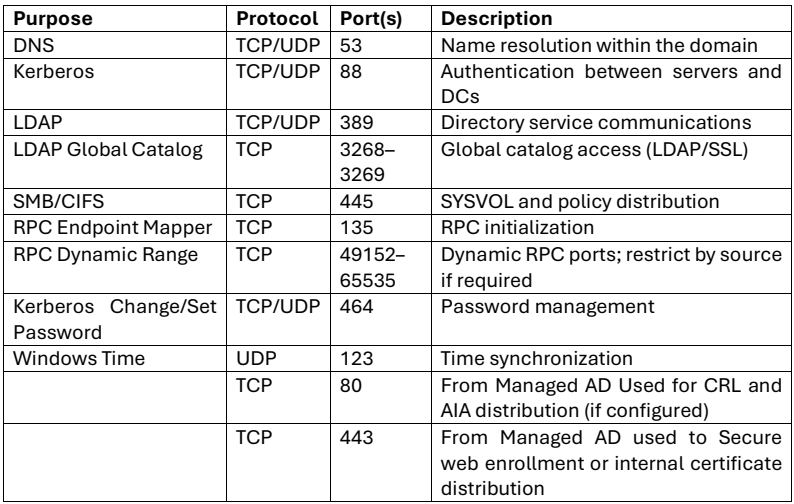
Security groups and network ACLs must allow communication between:
- Domain Controllers.
- Certification Authority server.
- Parallels RAS components.
Required connectivity includes services such as:
- DNS resolution.
- Kerberos authentication.
- LDAP directory access.
- SMB file access.
- RPC communication for certificate enrollment.
- CRL and AIA HTTP access.
Failure to configure required ports will result in authentication or certificate enrollment failures.
Step 1: Configure Enterprise Root Certification Authority as suggested here: Setting up Windows Server side to comply RAS SAML pre-requisites
Step 2: Configure Identity Provider and Parallels RAS:
- Configure your SAML Identity Provider and import Parallels RAS Service Provider metadata.
- Ensure identity attributes such as User Principal Name or account name match AWS Managed AD users exactly.
- In the Parallels RAS Console navigate to the SAML configuration section.
- Import Identity Provider metadata and configure trust settings.
- Configure the Enrollment Server to use the Enterprise Certification Authority.
Ensure all mappings and certificate configurations are accurate.
Refer to the RAS Admin Guide SAML section for detailed information: SAML Configuration.
Verification and Health Checks:
Open Command Prompt as an admin and run the following commands on the Certification Authority server.
echo %logonserver%
Expected result shows the domain controller name.
certutil -TCAInfo
If an untrusted CA error appears
- Confirm root certificate distribution via Group Policy.
- Verify CRL accessibility.
certutil -dcinfo
The expected output confirms the presence of
- Kerberos certificates.
- Domain controller authentication certificates.
Hardening and Maintenance:
Limit inbound SG sources to known subnets or specific domain controller IPs.
Use dedicated security groups for Parallels RAS services and AD services.
Back up the CA private key and database regularly.
Automate certificate renewals and distribution via GPO.
Prefer public CA certificates for externally exposed RAS gateways.
If any issues occur:
- Verify security group rules and required ports
- Check VPC flow logs for rejected traffic
- Confirm DNS resolution and time synchronization
- Validate Enrollment Server permissions on templates
- Ensure Certification Authority availability and health
Was this article helpful?
Tell us how we can improve it.