
Symptoms
Users are unable to create or use shortcuts within a published desktop/session, including on the desktop, redirected folders, or mapped drives.
The issue occurs only inside the remote session and no explicit error is shown. The shortcut creation fails or does nothing.
Cause
The issue is caused by Drive Redirection Cache.
When cache is set to Fast mode or Disabled, it interferes with file system operations within the session, including shortcut creation.
This is a session-level behavior and is not limited to a specific Parallels Client or version.
Resolution
If using Web Client ( User Portal) - Disable : Drive cache redirection
In RAS Console, navigate to FARM > RDSH > Settings > Uncheck : Drive cache redirection
If using Native Client (Windows/Mac) - Set cache to Enable
In Parallels Client > Connection Properties > Local Resources > Disk Drive > Click Configure > Cache : Enable
Settings in the Parallels client can be managed via RAS Policies, to change Cache for client to Enabled globally :
Navigate to - 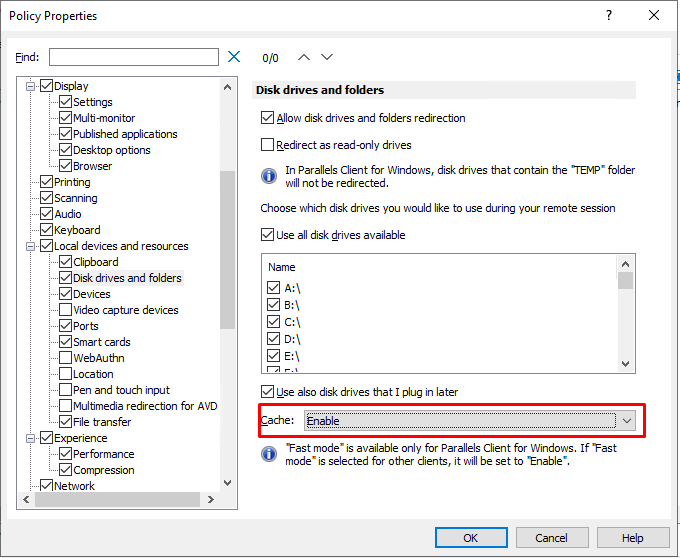 Policies > Local devices and resources > Cache : Enable
Was this article helpful?
Tell us how we can improve it.