
This guide is intended for administrators planning to migrate from Parallels Secure Workspace (PSW) to Parallels Remote Application Server (RAS). It covers feature and architecture mapping, migration tooling, and known limitations. The guide is based on Parallels RAS version 21.2 and will be updated as RAS evolves.
Symptoms
You are currently running Parallels Secure Workspace and are planning to transition users to Parallels RAS. You need guidance on how PSW features, deployment architectures, and configurations map to their equivalents in RAS, and on what tooling is available to assist with the migration.
Cause
Parallels Secure Workspace and Parallels RAS address overlapping use cases but follow different architectural approaches. PSW is appliance-based and bundles all functionality (authentication, session brokering, reverse proxy, and storage access) into one or more Linux virtual appliances, requiring no agents or client software. RAS uses a distributed, role-based Windows architecture with dedicated components for brokering, gateway, and publishing, and supports both native clients and browser-based access.
PSW covers three functional areas: remote access to Windows applications and desktops, SaaS and web application access via reverse proxy, and file storage. Of these, RAS 21.2 addresses remote Windows access fully. Web and SaaS access is handled through Parallels Browser Isolation (PBI), which can be combined with RAS for a unified user experience. File storage equivalent functionality is on the RAS roadmap and is not yet available in version 21.2.
Resolution
Technical comparison
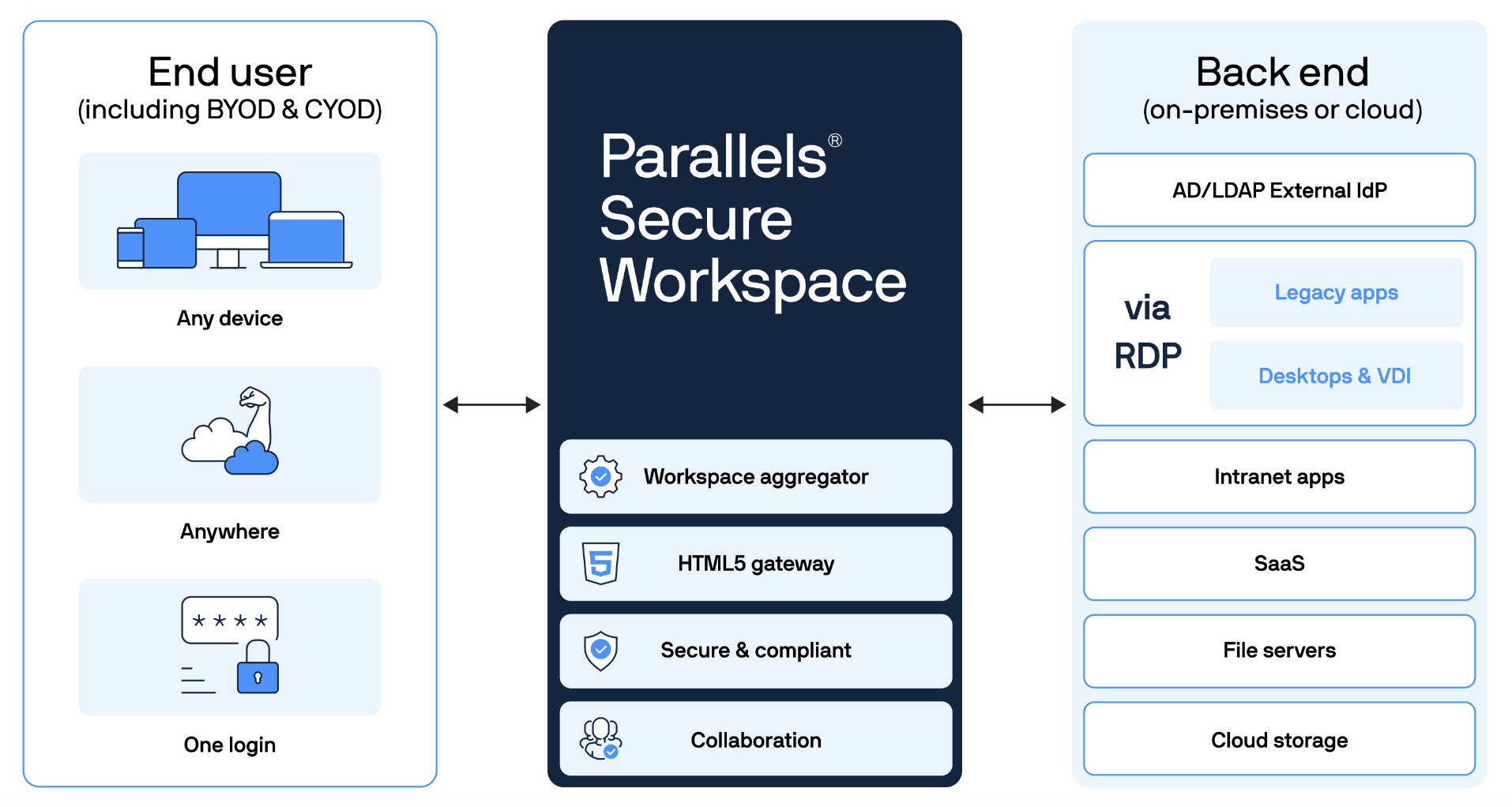
Parallels Secure Workspace architecture
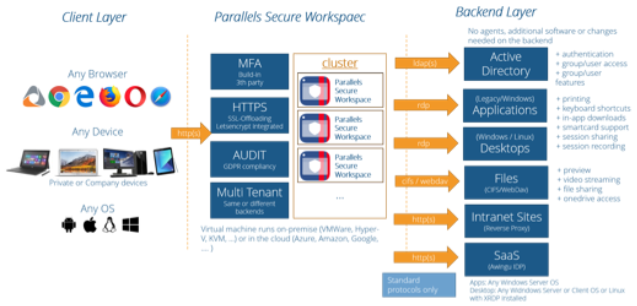
PSW uses a single Linux-based virtual appliance that handles all traffic: authentication, session brokering, reverse proxying, storage access, and user workspace delivery. In a single-appliance deployment, one virtual machine handles everything. For high availability, a minimum of three appliances with an external PostgreSQL database and an external load balancer are required.
Each appliance connects to the backend using standard protocols: LDAP(s) to Active Directory, RDP to Windows session hosts and VDI machines, SMB/CIFS to network file shares, and HTTPS to internal web applications via reverse proxy. No agents are needed on backend systems and no software is required on client devices - everything runs in the browser.
Parallels RAS architecture
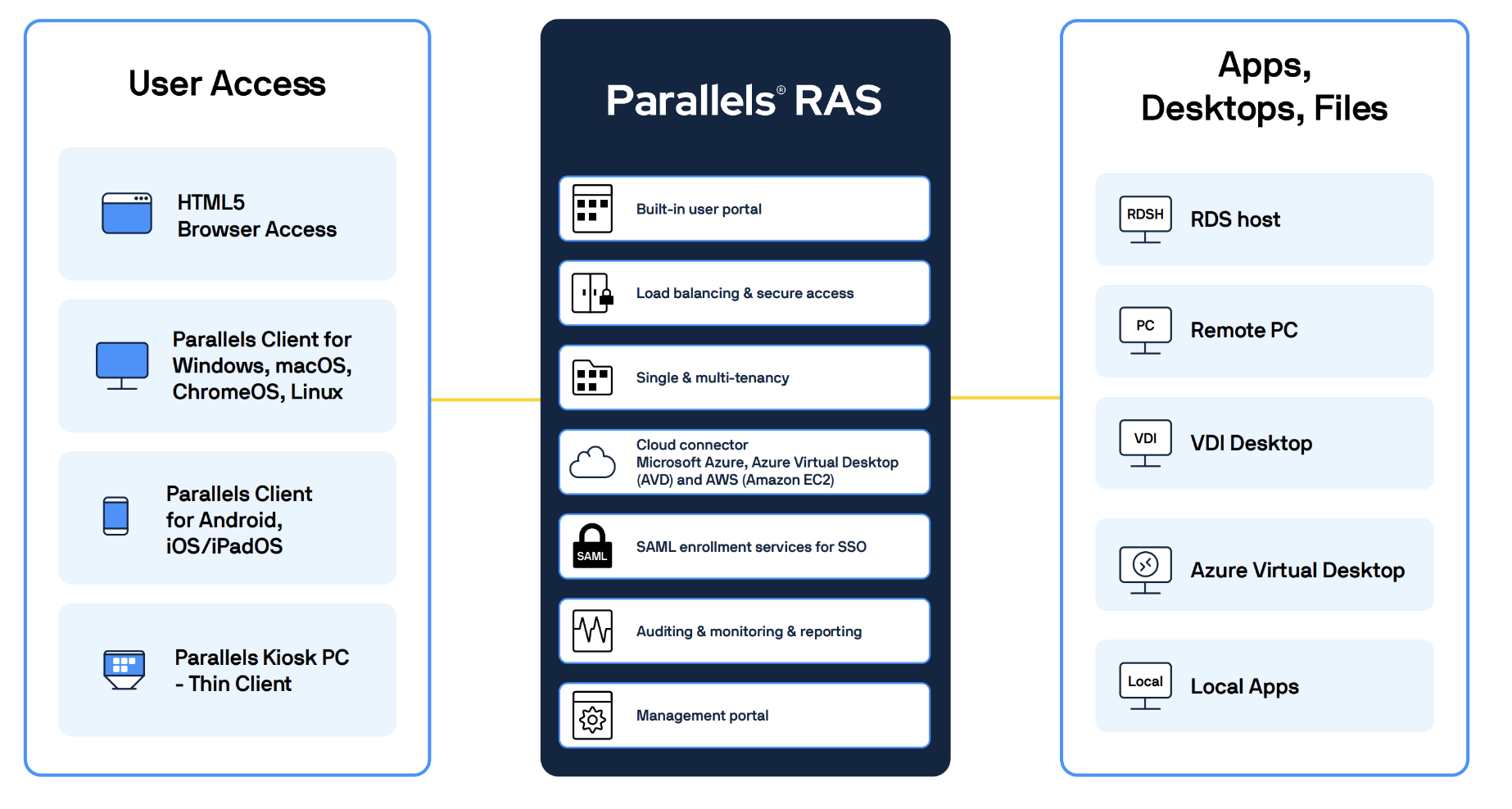
RAS follows a distributed, role-based architecture. Rather than bundling everything into a single appliance, RAS separates functionality into dedicated components - each installable on the same or different Windows servers - making them independently scalable and highly available. In addition to a web client, RAS provides native clients for Windows, macOS, Linux, Android, and iOS, as well as support for thin client platforms such as IGEL, 10Zig, and NComputing.
The main components and their roles are shown in the diagram below:
Key architectural differences
| Area | Parallels Secure Workspace | Parallels RAS |
|---|---|---|
| Platform | Linux-based virtual appliance | Windows-based distributed components |
| Client access | Browser only (no native client) | Web client and native clients (Windows, macOS, Linux, mobile) |
| High availability | Requires 3+ appliances + external PostgreSQL + external load balancer | Two Connection Brokers + two Gateways; no external database required |
| Backend agents | Not required | RAS Agent pushed to session hosts from the console |
| Administration | Via System Settings inside the PSW workspace | Dedicated RAS Console (Windows application) |
Feature mapping
Publishing desktops
In PSW, desktop publishing requires adding application servers to a resource list, then publishing the desktop via Manage → Applications → Add → Desktop Application. Three label types control the publication: User labels (who can access), Context policy labels (conditions for access), and Server labels (which backend servers are used).
In RAS, the equivalent is Publishing → Add → Desktop, linked to a Host Pool. Host Pools can be based on RDSH session hosts, VDI machines, Azure Virtual Desktop hosts, or Remote PCs, and can be static or dynamic (template-based with auto-provisioning and auto-scaling). RAS supports more filter dimensions than PSW - user, group, client device name, MAC address, IP address, OS, gateway used, theme, and more.
Publishing Remote Apps and RDP applications
In PSW, individual Windows applications can be published as Remote Apps or RDP Apps - either as published applications on an RDSH host or as direct binary shortcuts. In RAS, the equivalent is Publishing → Add → Applications, with four ways to define what to publish:
- Single Application - specify the executable path, arguments, working folder, and icon manually.
- Installed Application - pick from applications already installed on the host.
- Predefined Application - select from a built-in list of commonly published applications.
- Application Package - publish from a packaged format such as MSIX App Attach.
Login and admin permissions
| Area | Parallels Secure Workspace | Parallels RAS |
|---|---|---|
| Login default | No users can log in by default | All users can log in by default; access restricted per Theme |
| Admin model | Two types: regular user or full admin | Role-based: Root administrators, Power administrators, Custom administrators (granular per object type) |
| Admin config location | Configure → User Connector | Administration → Accounts |
MFA and SSO
In PSW, MFA and SSO are configured under Configure → User Connector and apply to the entire environment. The administrator can extend the standard login with MFA, or replace it with a SAML- or OIDC-based federated login.
In RAS, MFA and SSO are tied to Themes: each theme can carry its own login mechanism, allowing different user groups to authenticate differently from the same RAS deployment.
| Capability | Parallels Secure Workspace | Parallels RAS |
|---|---|---|
| Built-in TOTP MFA | Yes | Yes (Google Authenticator, Microsoft Authenticator, email-based) |
| Third-party MFA | Yes (Duo, SafeNet, and others) | Yes (Duo, SafeNet, and others) |
| SAML SSO | Yes | Yes (requires Enrollment Server component); configured under Authentication → SAML |
| OIDC | Yes | Not yet supported in RAS 21.2 |
Session feature controls (Client Policies)
PSW allows administrators to enable or disable a basic set of session features (printing, clipboard, upload, download) through user labels and context policy labels.
RAS provides a Client Policies framework that covers the same capabilities and considerably more - with the ability to define different policies per filter combination. For example, in PSW you can allow or deny clipboard access for a group of users. In RAS you can create separate policies for different groups, define the direction of clipboard operations (client to host, host to client, or both), and specify which content types (text, images, files) are permitted in each direction. Client Policies also govern peripheral redirection, detailed printer settings, auto-start of applications, connection parameters, and allowed client versions.
Branding
PSW supports a limited set of customization options for the login page and portal (logo, colors, custom login messages, background image). RAS supports the same for its web portal with more options, and additionally allows the Windows native client to be branded. In RAS, branding is linked to Themes, so different-looking portals and clients can be served to different user groups or business units from the same deployment.
Web and native client access
Users accustomed to the PSW web portal will find the RAS Web Client offers a near-identical experience: log in via the browser, click an application icon, and the application opens in a seamless window. For most end users, the transition is transparent.
Optionally, users can install the Parallels Client, which surfaces published applications in the local Start menu and Dock and enables features unavailable in the browser - local printing, USB redirection, webcam access inside remote applications, and offline file-type associations. Native clients are available for Windows, macOS, Linux, Android, and iOS.
Screen recording
PSW includes built-in session screen recording for compliance, auditing, and security purposes. Screen recording is not yet available in Parallels RAS 21.2. It is a high-priority roadmap item. Administrators who depend on session recording should factor this into their migration timeline and contact their Parallels partner or Sales Executive to discuss interim options and the expected RAS release timeline. This section will be updated once screen recording becomes generally available in RAS.
Architecture mapping
This section describes how common PSW deployment patterns map to an equivalent RAS architecture. Three patterns are covered: single appliance, clustered / high-availability, and multi-tenant.
Single PSW appliance
A single internet-facing PSW appliance serving a small number of Windows session hosts or VDI machines is the most common PSW deployment. It requires no external database and no clustering.
Mapping to RAS: In the simplest case, the RAS Gateway, Connection Broker, and session host role can all run on a single Windows machine. This all-in-one setup supports up to approximately 30 concurrent users. Optionally, a single HALB appliance can be placed in front of it (for example in the DMZ) so that the Windows machine stays on the internal network while the HALB handles internet-facing traffic.
For slightly larger setups that need more headroom without requiring high availability, the Gateway and Connection Broker can be installed on a dedicated Windows server and linked to existing session hosts or VDI machines. Key points when reusing existing infrastructure:
- Microsoft RD Connection Broker - if the PSW setup relied on the Microsoft RD Connection Broker role, this must be disabled before adding those machines to RAS. RAS uses its own Connection Broker and the two are not designed to run side by side.
- Existing RDSH session hosts - can be reused as-is. Add them to a Host Pool in RAS and push the RAS Agent from the console. No reinstall or reconfiguration of the server is required.
- Existing VDI machines - the same approach applies. Add them to a Host Pool and push the RAS Agent.
Clustered / high-availability PSW
A highly available PSW deployment requires a minimum of three appliances, an external load balancer, and an external PostgreSQL database for shared configuration and session state.
Mapping to RAS: HA in RAS requires only two Connection Brokers and two RAS Gateways across two or more machines. No external database is needed - RAS replicates configuration changes between Connection Brokers automatically when changes are applied. For load balancing, two options are available:
- External load balancer - suitable when running in a public cloud (Azure Load Balancer, AWS ELB) or when an existing load balancer is already in use.
- Built-in HALB appliance - a Parallels-provided virtual appliance that load-balances traffic across the gateway tier. For HA, two HALB appliances are deployed together with a floating virtual IP address so that if one fails, the other takes over without interrupting client connections.
Multi-tenant PSW
In PSW, multi-tenancy is independent of the number of appliances - even a single appliance can serve multiple tenants, each with a dedicated host header and optionally linked to a different Windows domain.
Mapping to RAS: Two approaches are available.
Option 1 - Map each PSW tenant to a RAS Theme. The simplest option when the purpose of the PSW tenants is different branding or different authentication methods per tenant, and all tenants share the same Windows domain. Limitations: themes require a single Windows domain and differentiate by URL path, not by host header. If tenants use distinct host headers or different Windows domains, this option does not apply.
Option 2 - Full multi-tenant RAS setup. For scenarios with multiple Windows domains or tenants that must be reached through different host headers. A dedicated tenant farm is configured, and individual tenants are joined to it. Each tenant is fully isolated with its own Windows domain. Incoming connections are routed to the correct tenant by tenant gateways that inspect the host header. This most closely mirrors what multi-tenant PSW deployments do today.
Migration script
A migration script is available to help transfer the configuration from a PSW environment into RAS, similar to the Citrix-to-RAS migration script. The script operates in three steps:
- Export data from Parallels Secure Workspace.
- Run a pre-import check for potential issues.
- Import data into Parallels Remote Application Server.
The script is built for single-domain deployments. Multi-tenant PSW setups with multiple, different Windows domains are not supported. For supported environments, the script will attempt to migrate:
- Session hosts.
- Desktop and RemoteApp applications.
- User and group permissions where possible.
- MFA configuration (users will need to reconfigure MFA on first sign-in).
- Let's Encrypt certificates if possible.
Note: Because some configuration is stored on the Microsoft Windows Remote Desktop infrastructure rather than in PSW itself, the original Connection Brokers and session hosts must be online during import - they are queried to supplement missing information.
For multi-tenant PSW setups where two Workspace domains point to the same Active Directory: the script will create a RAS Theme for each Workspace domain. Session hosts are added once, and applications are matched by name. For example, if both Workspace domains published an application named "Excel", it appears once in RAS. Filtering will require users to be signed in through one of the two themes, and user/group restrictions are applied accordingly.
Migration script limitations
| Item | Notes |
|---|---|
| Multiple Active Directories | PSW environments linked to different Windows Active Directories cannot be migrated to a single RAS deployment with the script. |
| SSO | Not migrated automatically. OIDC is not yet supported in RAS. SAML requires manual setup - sensitive configuration cannot be exported via the API, and redirect URLs must be updated on the identity provider. |
| Branding | Different image sizes (wide vs. square logo) are not currently supported by the script. |
| Reverse-proxied web applications | Not migrated. Use Parallels Browser Isolation or publish a browser on a session host. |
| Application categories | PSW allows multiple categories per application; RAS expects each published item to belong to one folder only. |
| Files and file extensions | Not in scope for the current version of the script. |
| Feature restrictions (Device Policies) | Not migrated automatically. Require manual setup of Client Policies in RAS. |
| Manual SSL certificates | Not migrated automatically. |
Was this article helpful?
Tell us how we can improve it.