
When a user launches an Azure Virtual Desktop application or desktop through Parallels RAS, the browser may open the Azure Virtual Desktop landing page instead of starting the selected resource.
This issue affects RAS clients other than Parallels Client for Windows. It applies to launch workflows that use the Microsoft Azure Virtual Desktop web client.
Symptoms
- An Azure Virtual Desktop application or desktop is published through a Parallels RAS AVD provider.
- The user launches the resource from the RAS User Portal or another RAS web access workflow.
- The browser opens the Azure Virtual Desktop landing page, but the selected application or desktop is not launched automatically.
- The issue may affect existing AVD provider configurations that still contain the previous Web access URL format.
Cause
The Azure Virtual Desktop web access endpoint format has changed. Existing Parallels RAS AVD provider configurations may still contain the previous endpoint, which no longer starts the selected application or desktop as expected.
Newer Parallels RAS builds use the updated Web access URL format. Existing provider configurations may require a manual update.
Resolution
Update the Web access URL in the AVD provider properties.
- Open the Parallels RAS Console.
- Open the properties of the Azure Virtual Desktop provider.
- Locate the Web access URL setting on the provider's properties page.
- Replace the existing URL with the following URL:
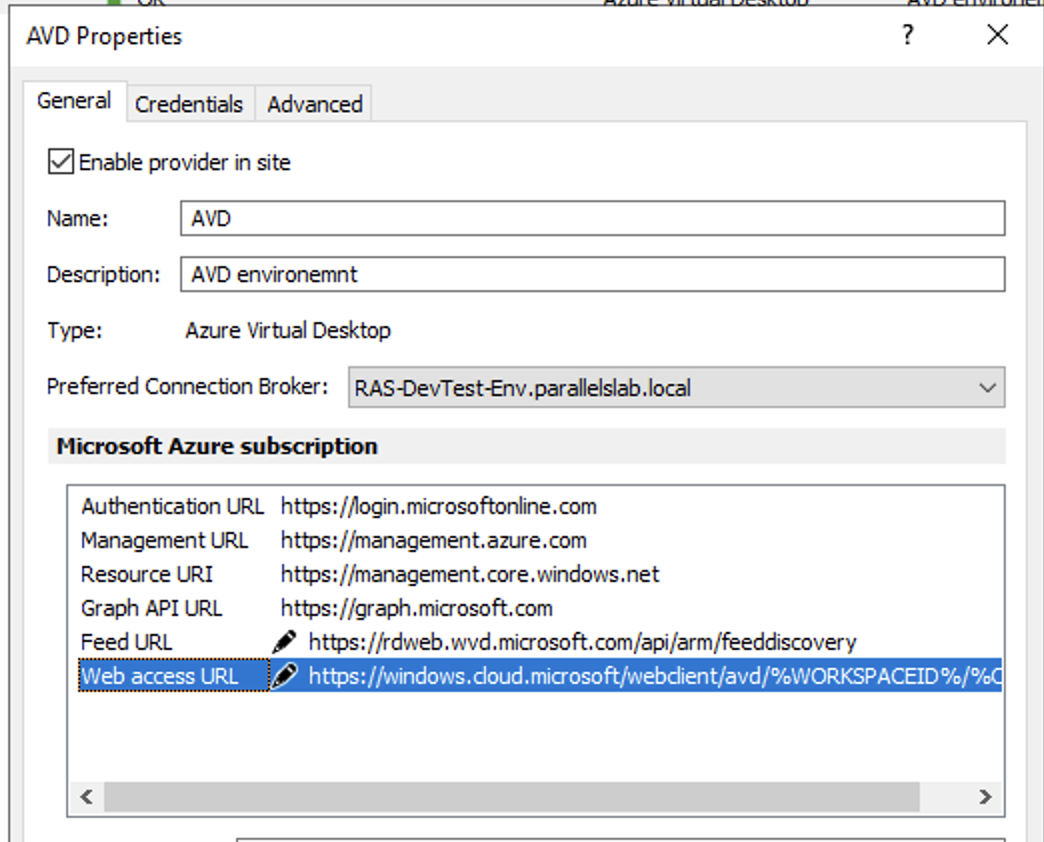
https://windows.cloud.microsoft/webclient/avd/%WORKSPACEID%/%OBJID%
- Save the provider properties and apply the configuration changes.
- Test launching both an Azure Virtual Desktop application and an Azure Virtual Desktop desktop.
Important: Keep the placeholders %WORKSPACEID% and %OBJID% unchanged. RAS replaces them with the workspace and resource identifiers when generating the launch link.
URL comparison
| Configuration | Web access URL |
|---|---|
| Previous URL | https://rdweb.wvd.microsoft.com/api/arm/weblaunch/tenants/%WORKSPACEID%/resources/%OBJID% |
| Current URL | https://windows.cloud.microsoft/webclient/avd/%WORKSPACEID%/%OBJID% |
Note: The URL update is required only for provider configurations that still use the previous Web access URL. Do not change the AVD provider's Feed URL or other Azure subscription URLs as part of this procedure.
Was this article helpful?
Tell us how we can improve it.