
Symptoms
- A user signs in to the Parallels RAS User Portal and launches a published Microsoft 365 (Office) application, for example Excel.
- During Office activation, after entering the account email address and selecting Next, the following error appears:
Something went wrong. [4nsvw]
- The Windows System event log on the RD Session Host may contain a warning similar to:
The application-specific permission settings do not grant Local Launch permission for the COM Server application with CLSID {21B896BF-008D-4D01-A27B-26061B960DD7} and APPID {03E09F3B-DCE4-44FE-A9CF-82D050827E1C} to the user ... running in the application container. - The System event log may also contain errors referencing
Microsoft.AAD.BrokerPluginfailing to start.
Cause
Modern Office activation (Shared Computer Activation / Modern Authentication sign-in) relies on a helper process, ShellAppRuntime.exe, being available in the user's session. This process hosts the Web Account Manager (WAM) broker plugin (Microsoft.AAD.BrokerPlugin) that Office uses to complete sign-in.
When a published application is launched from the Parallels Client, as a published desktop, or as a direct RemoteApp connection, Windows starts the desktop shell components for the session, which in turn starts ShellAppRuntime.exe. When the same application is launched from the RAS User Portal (a browser-based RemoteApp session), the session can be initialized without these shell components, so ShellAppRuntime.exe is not running when Office attempts to activate. As a result, the WAM broker plugin cannot start, the DCOM launch warning above is logged, and Office activation fails with the generic error [4nsvw].
Note: Modifying DCOM Launch and Activation permissions for the COM server referenced in the event log warning does not resolve this issue. The underlying cause is that the helper process is missing from the session, not a permissions problem.
Resolution
Configure ShellAppRuntime.exe to start for the user session, regardless of how the session is launched:
- Open the Group Policy Management Console and edit (or create) a GPO that applies to the affected users.
- Go to User Configuration > Policies > Windows Settings > Scripts (Logon/Logoff).
- Open Logon properties, go to the Scripts tab, and click Add.
- In Script Name, enter:
C:\Windows\System32\ShellAppRuntime.exe - Click OK to save, then link the GPO to the organizational unit containing the affected users and apply the policy.
- Have the user sign out completely and start a new session, then launch the published Office application from the User Portal and attempt activation again.
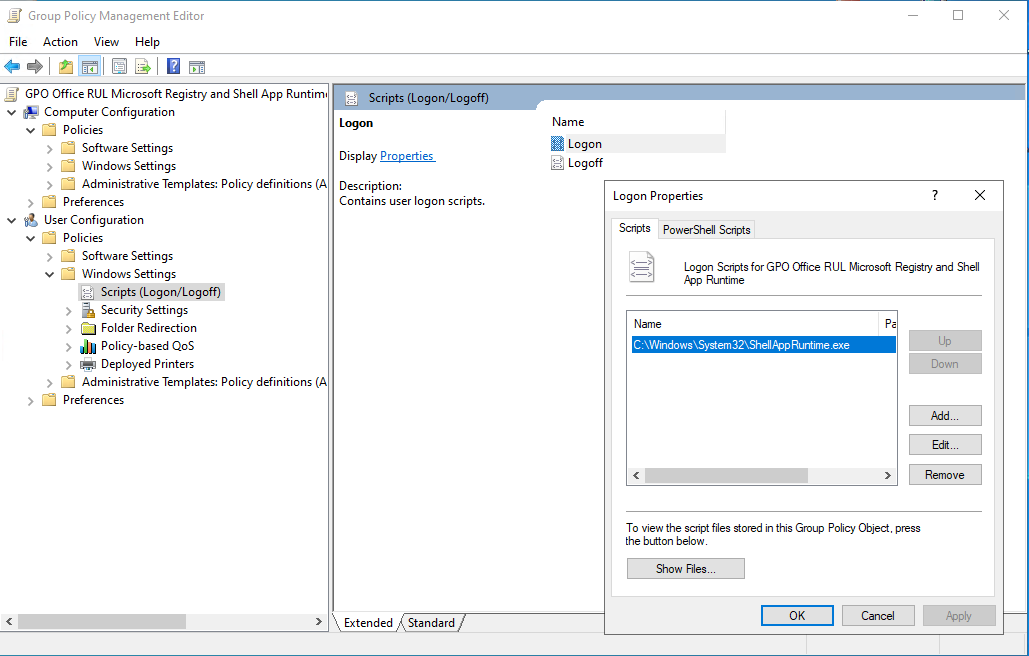
This ensures the WAM broker helper process is available when Office attempts Modern Authentication-based activation, whether the session was started from the User Portal, the Parallels Client, or a published desktop.
Note: If your environment uses FSLogix Profile Containers or Office Containers, the -runexplorer parameter on the published application is still recommended in addition to this workaround.
Was this article helpful?
Tell us how we can improve it.