
Known Issues and Limitations:
This article outlines known issues identified during the use and upgrade of RAS Console, Reporting, and Cost Insights components, particularly when mixing different product versions.
1. Reporting Data Not Generated When Using Mixed Console and Reporting Versions:
When a v20 RAS Console is connected to a fresh installation of v21 Reporting, session data from VDI and AVD hosts is not written to the reporting database. As a result, reports cannot be generated.
Although sessions are successfully launched, reporting data is missing.
The following errors are observed in the reporting logs:
[I 101/00000000] Wed Sep 24 11:37:52 2025 - DeviceInfo: 1 items
[I 101/00000000] Wed Sep 24 11:38:07 2025 - SessionInfo: 1 items
[E 101/00000000] Wed Sep 24 11:38:07 2025 - AddSessionDetails:SDTransProtocol Exception: (Session_ID: 2) - An error occurred while updating the entries. See the inner exception for details.
[E 101/00000000] Wed Sep 24 11:38:07 2025 - AddSessionDetails:ConnQuality Exception: (Session_ID: 2) - An error occurred while updating the entries. See the inner exception for details.
[E 101/00000000] Wed Sep 24 11:38:07 2025 - AddSession Exception: (RDPSession_ID: 2) - An error occurred while updating the entries. See the inner exception for details.
[E 101/00000000] Wed Sep 24 11:38:07 2025 - AddSession Failed
After upgrading the RAS Console to v21, the issue is resolved. Reporting data for newly launched VDI and AVD sessions is stored correctly, and reports are generated as expected.
2. Inability to Install Reporting v21.0 on a System with Console v20.2:
Installing Reporting v21.0 using the RAS Installer on a system that already has RAS Console v20.2 installed is not possible.
The v21.0 MSI installer automatically proceeds with upgrading the console, which prevents users from performing a custom installation to install the Reporting component only.
3. Reports Show No Data Despite Successful Installation of Core and Reporting:
A system with Core v20.2.26015 and Reporting v21.0.26213 installed successfully on the same machine does not display any reporting data, even after multiple sessions are launched.
Log analysis suggests an issue with host pool data parsing, preventing entries from being written to reporting tables such as:
-
RDSessions -
SDTransProtocol
Relevant Log Errors:
controller.log:
[W 00/0000016B/T2594/P19C8] 24-09-25 10:16:10 - Failed to initialize Reporting Agent 10.5.1.229:30008. Error: Unknown (0).
reporting.log:
[E 101/00000000] Wed Sep 24 12:34:04 2025 - Failed to parse HPools List Packet
[E 101/00000000] Wed Sep 24 12:34:04 2025 - Client Connection - Thread Proc - Exception (Type provided must be an Enum.)
[I 101/00000000] Wed Sep 24 12:34:04 2025 - OSInfo: 3 items
[I 101/00000000] Wed Sep 24 12:34:04 2025 - Machine State Logs Retention Done
[I 101/00000000] Wed Sep 24 12:34:04 2025 - Publishing Agent Connection Retention Done
[I 101/00000000] Wed Sep 24 12:34:04 2025 - Applying Database Retention: Logon Details Retention Date: 8/27/2025 12:34:04 PM
[I 101/00000000] Wed Sep 24 12:34:04 2025 - Applying Database Retention: User Experience Retention Date: 8/27/2025 12:34:04 PM
[I 101/00000000] Wed Sep 24 12:34:04 2025 - User Experience Retention Done
When launching a session, the following errors occur:
[I 101/00000000] Thu Sep 25 07:35:18 2025 - SessionInfo: 1 items
[E 101/00000000] Thu Sep 25 07:35:18 2025 - AddSessionDetails:SDTransProtocol Exception: (Session_ID: 2) - An error occurred while updating the entries. See the inner exception for details.
[E 101/00000000] Thu Sep 25 07:35:18 2025 - AddSessionDetails:ConnQuality Exception: (Session_ID: 2) - An error occurred while updating the entries. See the inner exception for details.
[E 101/00000000] Thu Sep 25 07:35:18 2025 - AddSession Exception: (RDPSession_ID: 2) - An error occurred while updating the entries. See the inner exception for details.
[E 101/00000000] Thu Sep 25 07:35:18 2025 - AddSession Failed
[E 101/00000000] Thu Sep 25 07:35:18 2025 - Failed to End Idle State:: session id: 2; session started: 9/25/2025 6:25:46 AM
3. Cost Insights Displays No Data After Initial Enablement:
After enabling Cost Insights for the first time, the Cost Insights tab displays an empty screen with no data.
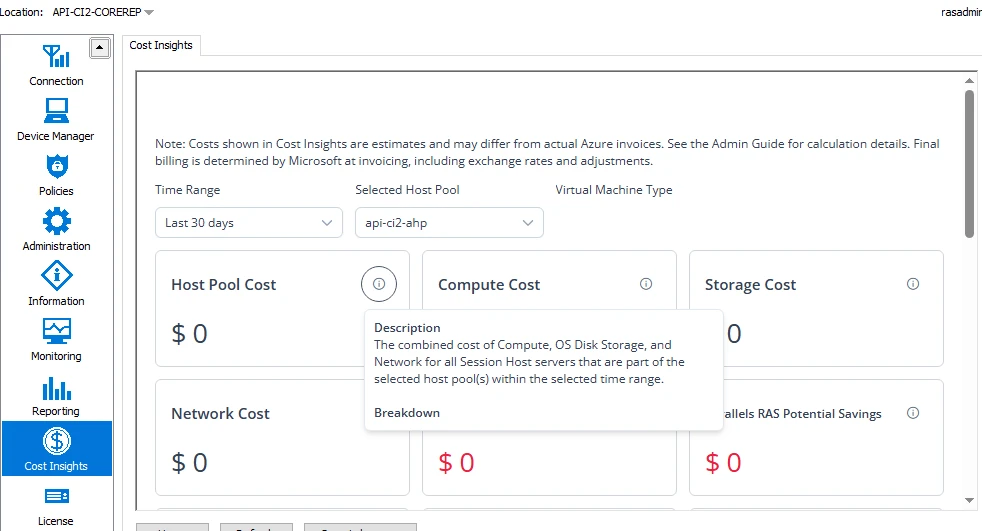
This behavior is expected. Cost Insights requires sufficient time to collect and process data after being enabled. Until the data collection period is complete, no information will be displayed.
4. When RAS and Reporting versions earlier than v21.0 are installed on the same system, special care must be taken during upgrades.
Scenario 1: RAS Upgraded Without Upgrading Reporting
-
RAS is upgraded to v21.0
-
Reporting remains on a version earlier than v21
-
Cost Insights is installed using the RAS Installer
Result:
Reporting stops functioning. This occurs because RAS v21 manages reporting but cannot properly track a reporting version installed outside its upgrade path.
As a result, RAS may remove reporting components that it considers obsolete or leftover.
Resolution:
Upgrade Reporting to v21.0 to restore functionality.
Scenario 2: RAS and Reporting Upgraded Together
-
Both RAS and Reporting are upgraded to v21.0
-
Cost Insights is installed afterward
Result:
All components function correctly. Since Reporting is on a matching version, RAS can track and manage it properly.
Was this article helpful?
Tell us how we can improve it.