
Starting with Parallels RAS 21.2, the legacy Web Client API, the appinfo URL mechanism used by some third-party web portals to sign users in to the RAS User Portal, is disabled by default on both new installations and upgrades.
This change improves security because the old mechanism could be abused for reflected cross-site scripting (XSS) and server-side request forgery (SSRF) attacks.
If your portal still uses a URL similar to one of the following:
1. https://<gateway>/userportal/?appinfo=https://<your-server>/<app>.js&theme=<themename>#/launch
2. https://<gateway>/<themename>/?appinfo=https://<your-server>/<app>.js#/launch
You will receive a message that the API is now deprecated or blocked:

This article explains how to migrate your integration to the new Authentication Handoff API, and how to temporarily re-enable the legacy API while you complete the migration.
How to migrate to the Authentication Handoff API
The Authentication Handoff API replaces the legacy appinfo mechanism. Instead of loading credentials from a JavaScript file referenced in a URL, your portal submits credentials directly to the RAS Secure Gateway in a POST request, and the Gateway responds with a redirect to the User Portal.
- Stop generating and hosting the
appinfo.jspayload file, and remove the call to_RASWebClientLoadApp()/_RASHTML5LoadApp(). - Replace the GET request to the
?appinfo=URL with a POST request to:https://<user-portal-domain>/userportal/auth-handoff<user-portal-domain>is the IP address or FQDN of the RAS Secure Gateway. The Enable User Portal option must be enabled for the Secure Gateway in the Parallels RAS Console. - Submit the request payload as a JSON object in the body of the POST request — see Example below.
- Rename request fields using the mapping table under Parameter mapping below.
- If your frontend does not have direct access to the user's credentials; for example, if credentials are held only by your backend, initiate the POST request from your backend instead. Relay the HTTP redirect response from the Gateway to the client browser without modification. Do not modify the redirect target or inspect any tokens it carries.
- Remove the hosted payload endpoint from your web server once the migration is verified.
- Test the integration against a Parallels RAS 21.2 (or later) environment, with the legacy API in its default, disabled state.
Note: The Secure Gateway validates the credentials and returns an HTTP redirect (3xx, typically 302). The browser follows the redirect to the User Portal, and if appid was specified, the requested resource launches immediately. Your integration does not need to handle tokens, manage sessions, or inspect the redirect target — this is managed entirely by the User Portal Secure Gateway.
Example: Request payload
{
  "username": "alice",
  "password": "********",
  "login": "https://your-portal.example.com/login",
  "logout": "https://your-portal.example.com/logout",
  "appid": 2,
  "theme": "dark",
  "p": "key=value",
  "extra": {
    "redirectLinks": true,
    "redirectPrinter": false,
    "redirectSound": true,
    "keyboardCompMode": true,
    "keyboardLayout": "1033",
    "redirectClipboard": "3"
  }
}
Important: Because the payload contains user credentials, generate it dynamically for each user and submit it over HTTPS. Never embed credentials in static pages or URLs.
| Field | Required | Description |
|---|---|---|
username |
Yes | RAS username, validated by the Secure Gateway. |
password |
Yes | RAS password, validated by the Secure Gateway. |
login |
No | URL of your portal's sign-in page, used on session refresh or sign-in error. |
logout |
No | URL of your portal's sign-out page, used when the user signs out. |
appid |
No | ID of the published resource to launch immediately, shown in the RAS Console under Publishing, on the resource's Information tab. If omitted, the user sees all resources available to them in the User Portal. |
theme |
No | Theme name forwarded to the User Portal. |
p |
No | Additional launch parameter string. |
extra |
No | Per-session redirection settings: links, printer, sound, keyboard, and clipboard. |
Parameter mapping (legacy API to new API)
| Legacy API | Authentication Handoff API | Notes |
|---|---|---|
?appinfo=https://.../appinfo.js |
POST /userportal/auth-handoff |
Launch data is no longer passed through a URL. |
u |
username |
Renamed for clarity. |
q |
password |
|
a (e.g. "#4") |
appid (e.g. 2) |
Now a plain integer; remove the # prefix used by the legacy API. |
logonURL |
login |
|
logoutURL |
logout |
|
theme (URL parameter) |
theme (POST body) |
Now part of the JSON payload. |
p |
p |
Unchanged. |
extra |
extra |
Unchanged. |
How to temporarily re-enable the deprecated Web API
This is not recommended and should only be used as a short-term measure while you complete the migration above. The legacy API will be removed entirely in a future version of Parallels RAS.
To re-enable it using the RAS Console:
- Open the Parallels RAS Console.
- Go to Farm > Sites > Secure Gateways.
- Select the relevant secure gateway and open its properties.
- Go to the Security tab.
- Clear Block access to deprecated Web API.
- Click OK and apply the changes.
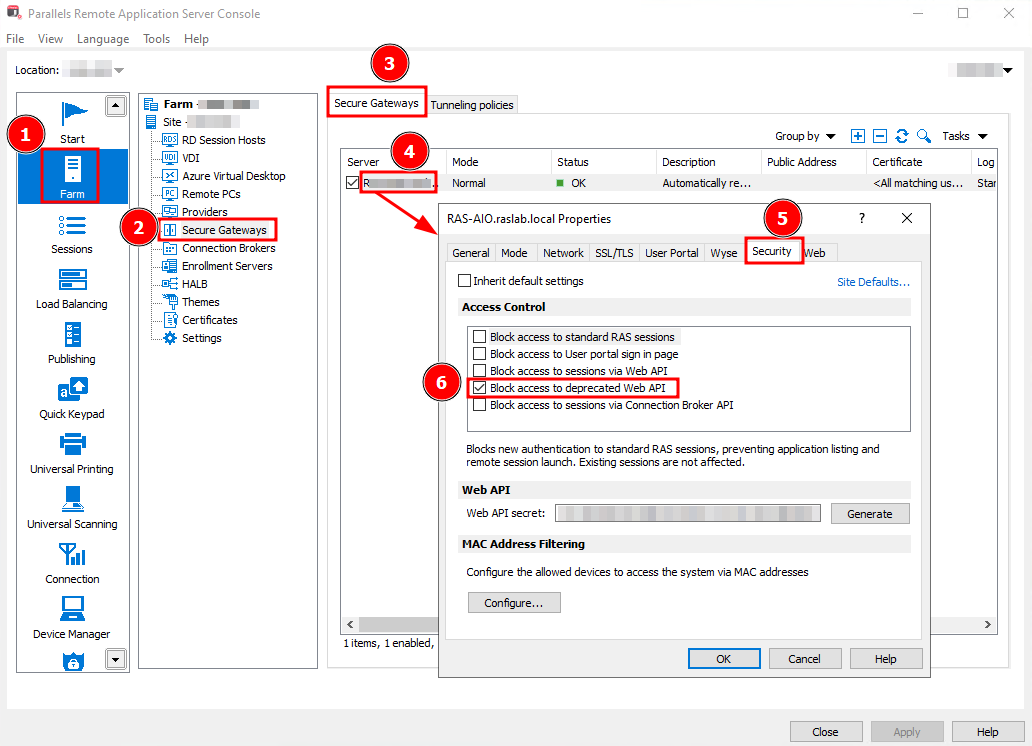
Note: If Block access to sessions via Web API is also enabled, the deprecated Web API remains blocked regardless of this setting. In that case, Block access to deprecated Web API is automatically selected and cannot be cleared.
Alternatively, in the User Portal's config.ini file located at C:\Program Files (x86)\Parallels\ApplicationServer\2XHTML5Gateway, set:
env_blockdeprecatedwebapi=false
Restart the RAS Secure Gateway service after making this change.
Version timeline
| Parallels RAS version | Legacy Web Client API status |
|---|---|
| Up to 21.1 | Available (deprecated). Migrate now. |
| 21.2 and later | Disabled by default. Can be temporarily re-enabled — see above. |
| Future version | Will be removed entirely. |
Was this article helpful?
Tell us how we can improve it.