Search

Language:  
Search for:

Available article translations:

Parallels Tools Troubleshooting

Article ID: 111730 
Created On: Jul 29, 2011
Last Review: Sep 11, 2012
Views:
Was this article helpful?
No Yes
APPLIES TO:
  • Parallels Desktop

ISSUE

        Or

  • Some or most of the features of Parallels Tools do not function correctly in Virtual Machine.

CAUSE

Parallels Tools may not be installed or fail to install due to several different reasons, most of them are related to Windows misconfiguration.

RESOLUTION

Step 1 - Find the type of the issue you face and proceed to the corresponding step to solve it:

  • Some or most of the features of Parallels Tools do not function correctly in Virtual Machine:
    • Mouse Synchronisation
    • Time Synchronisation
    • Drag-and-Drop
    • Clipboard Synchronization
    • Dynamic Resolution
    • Shared Folders
    • Coherence
    • Shared Profile
    • Shared Applications
    • Shared Internet Applications
    • SmartMount
     
              Go to Step 2.1 below.
     
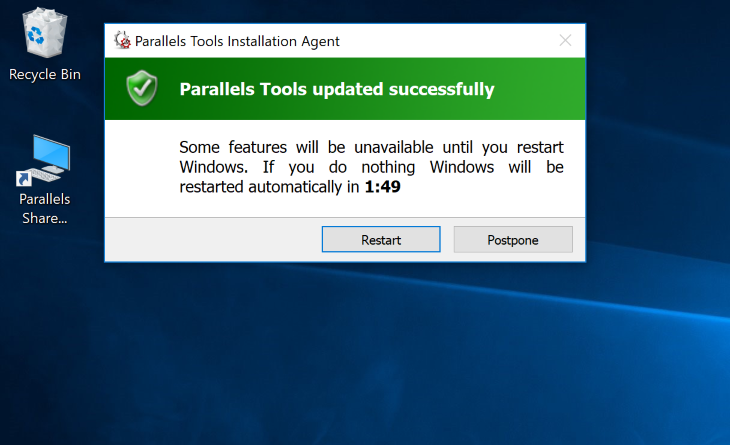
  • Parallels Tools failed to install. Message window appears: 'Parallels Tools Installation Agent' with text 'There was a problem updating Parallels Tools'

  → Go to Step 2.2 below.

  • "Parallels Tools - Setup Wizard" started and after some time failed. Message window appears: 'Parallels Tools Installer Information' with text 'Error [xxx]. [error-description]' 

 Go to Step 2.3 below.

  • "Parallels Tools - Setup Wizard" started and after some time rolled back and failed. Message window appears: 'Parallels Tools Installer Information' with text 'Error [xxx]. [error-description]' 

 Go to Step 2.4 below.

  • Virtual machine includes a virtual CD drive but there is no CD drive in My Computer. Cannot install Parallels Tools. 

 You can find a solution here: http://kb.parallels.com/5076

  • Cannot install Parallels audio driver in Windows XP virtual machine 

 You can find a solution here:http://kb.parallels.com/en/9324

  • "New device found" message appears after every Windows XP start

 One of the solutions is to remove the USB mouse device. Please refer to the following KB article: http://kb.parallels.com/en/9322

  • Other issues with Parallels Tools installation

 You can find a solution in the following KB article: http://kb.parallels.com/8969

→ Please follow this article: http://kb.parallels.com/en/112609

Step 2.1. Some or most of the features of Parallels Tools do not function correctly in Virtual Machine


Check if Parallels Tools are installed - go to Start menu → Control Panel → Add or Remove programs → search for Parallels Tools. if it is not installed follow the steps below:

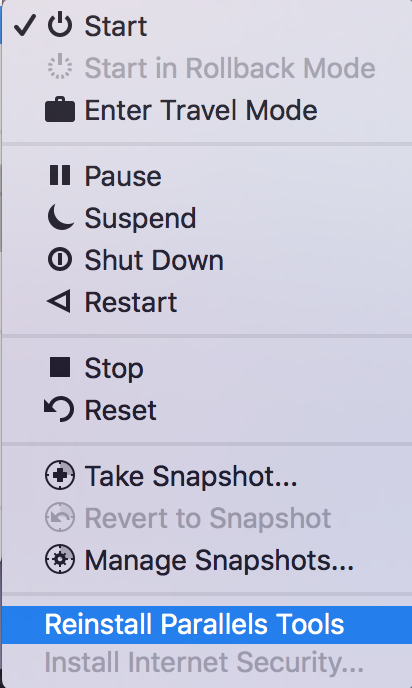
  • Install Parallels Tools using "Install Parallels Tools" menu item in the Action menu (Parallels Desktop versions 2 and 3), or Virtual Machine menu (Parallels Desktop 4 or higher or Parallels Workstation 2.2 and Extreme).
  • Reboot Windows one more time.

 In the case that Parallels Tools has already installed, you must reinstall Parallels Tools in the Windows Guest OS as well. To learn how to reinstall Parallels Tools in the Windows Guest OS please see the following Knowledge Base article.


Step 2.2. Parallels Tools failed to install with window: 'Parallels Tools Installation Agent' 'There was a problem updating Parallels Tools'

  • file /Library/Parallels/Tools/prl-tools-win.tar.gz is missing or corrupted.
    Please reinstall Parallels Desktop.
  • If this is the first Parallels Tools installation in this Virtual machine
    Check that /Library/Parallels/Tools/prl-tools-win.iso exists.
If the file is in place verify that it is connected to the Virtual machine.
To do it go to Devices menu - CD/DVD and connect it to the Virtual machine as described in this KB article: 
http://kb.parallels.com/en/111743

 If this file is missing please reinstall Parallels Desktop. 
  • In order to get the exact error message instead of general (foreground) one please proceed with manual installation of Parallels Tools as mientioned in this kb article: 111730  and proceed to step 2.3.
  • In case previous steps do not help please contact Parallels Technical Support Team

Step 2.3. Known error codes 

Often when the error message appears it contains an internal error code.  You can find several known error codes below.

  • Error 1402 or 1406
       
    Error 1402: (Could not open key: HKEY_Local_Machine32\Software\Microsoft\Windows\CurrentVersion\InternetSettings\ZoneMap\Domains\psf)

    or
       
    Error 1402: (Could not open key: HKEY_Local_Machine32\Software\Wow6432Node\Microsoft\Windows\CurrentVersion\InternetSettings\ZoneMap\Domains\psf)

    Following articles can help help you resolve this issue:
  • Error 1935, message contains "HRESULT: 0x080070057/ 0x800736FD/ 0x80070BC9": 
     
    Error 1935.An error occurred during the installation of assembly component {98CB24AD-52FB-DB5F-A01F-C8B3B9A1E18E}. HRESULT: 0x80070BC9
  • Error 2738 "Could not access VBScript runtime for custom action"
  • "Failed to marshal script action"  (in Windows 2000 virtual machines)


Step 2.4. Rollbacks

Sometimes the Parallels Tools installation stops in the middle of the process and then rolls back without an error message. Parallels Tools installation wizard may just warn you that installation failed and reboot is needed. In such cases it is necessary to investigate parallels-tools-setup.log file that is located in C:\WINDOWS\Temp folder.

Go to the end of file. Make sure that the last string contains actual date & time from Windows: 

"=== Verbose logging stopped: 7/4/2011 14:13:04 ==="
 

Return code 3010 in one of the previous strings means OK. Parallels Tools was installed successfully. 
"MainEngineThread is returning 3010"
 
Return code 1603 means 'failed'. Note, that message "Info 1603" is not the error itself!

Search for the beginning of the current log. Scroll up to the previous "Verbose logging started" occurence. Be sure that date & time of beginning of the log are actual.
"=== Verbose logging started: 10/28/2010 15:38:10 Build type: SHIP UNICODE 5.00.7600.00 Calling process: C:\Windows\SysWOW64\msiexec.exe ==="


Search for the first occurence of  "Rollback:" message as first symbol in the string. Look up error code in some strings above this "Rollback:"

Error 1627: 
Look for the following strings:
DIFXAPP: ERROR: InstallDriverPackages failed with error 0x65B
    DIFXAPP: RETURN: InstallDriverPackages() 1627 (0x65B)

The solution for this issue can be found here.


Error code 0xE0000100: The style of the INF is different than what was requested
http://kb.parallels.com/en/9 388 

Error code 0x3: The system cannot find the path specified
Could not open file C:\Windows\System32\DriverStore\FileRepository\prl_mouf.inf_x86_neutral_2209e2708eaa50e2\prl_mouf.inf. (Error code 0x3: The system cannot find the path specified.)

http://kb.parallels.com/en/9388 

Step 2.5. Submit Problem Report:

If the issue is still not solved or you have difficulties with any of the steps outlined above, please submit the Problem Report from Help menu > Report a Problem.  Remember the Problem Report ID and keep it for technical support department.  Contact Parallels Technical Support.

NOTEIt will speed up the issue resolution process if you send the results of the above troubleshooting and Problem Report ID when submitting your support request.


1e5db16426987d561060acdf56d947b4 64d8d09669cff87d685a09b84f40c490 3d21a9c32818fc58b044121ce91e053c

Was this article helpful?
No Yes


For Home
For Hosters
For SaaS
For IaaS
 
Desktop Virtualization
- Parallels Desktop 8 for Mac
- Parallels Transporter
- Parallels Mobile
- Parallels Desktop Switch to Mac Edition
- Parallels Desktop for Mac Enterprise Edition
- Parallels Management-Mac for Microsoft SCCM
Server Virtualization
- Parallels Cloud Server
- Parallels Containers for Windows 6.0 Beta
- Parallels Virtuozzo Containers
Automation
- Parallels Automation
- Parallels Automation for Cloud Infrastructure
- Parallels Business Automation Standard
- Parallels Virtual Automation
- Parallels Plesk Panel Suite
- Web Presence Builder
- Parallels Plesk Automation
- Parallels Small Business Panel
- Parallels Domain/SSL Reseller Program
- Value-added Services for Hosters
- Parallels Partner Storefront