
Effective March 27, 2026, the Microsoft Remote Desktop client for Windows will reach end of support. After this date:
- It will no longer be available for download.
- It will stop receiving security updates and feature updates.
Organizations using Parallels RAS to provide access to resources hosted in Azure Virtual Desktop (AVD) should take action to ensure uninterrupted service.
Parallels RAS Integration with Azure Virtual Desktop
Parallels RAS integrates seamlessly with Azure Virtual Desktop, enabling organizations to publish and deliver applications and desktops hosted in AVD.
When users connect to these resources using the Parallels RAS Client for Windows, the session has historically relied on the Microsoft Remote Desktop client for Windows to establish the connection.
Windows App as the Replacement
Microsoft has introduced the Windows App as the successor to the deprecated Remote Desktop client.
Beginning with Parallels RAS version 21, organizations can use the Windows App as the underlying connection mechanism for AVD-based resources. This ensures continued compatibility and a transparent transition away from the deprecated client.
Required Actions
If your environment uses Parallels RAS to access Azure Virtual Desktop:
-
Upgrade to Parallels RAS version 21 or later.
This version includes integrated support for the Windows App. -
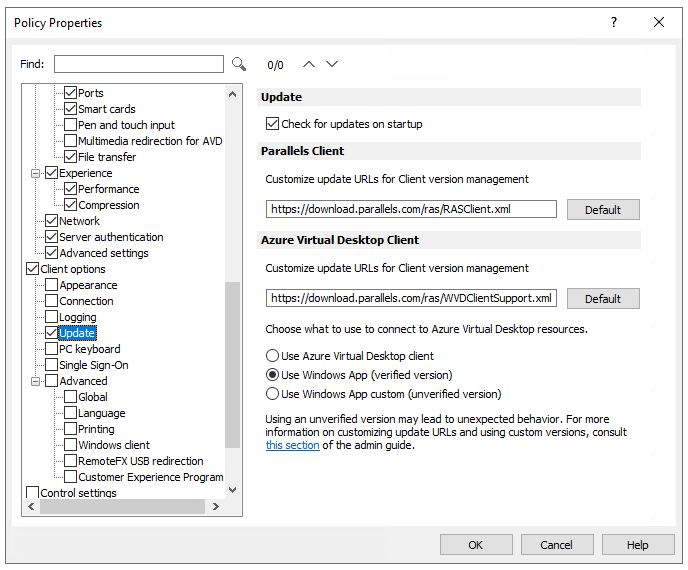
Configure Parallels RAS to use the Windows App instead of the Microsoft Remote Desktop client (Azure Virtual Desktop Client).
This can be done:
In the Parallels RAS Console, or
Directly within the Parallels RAS Client for Windows.
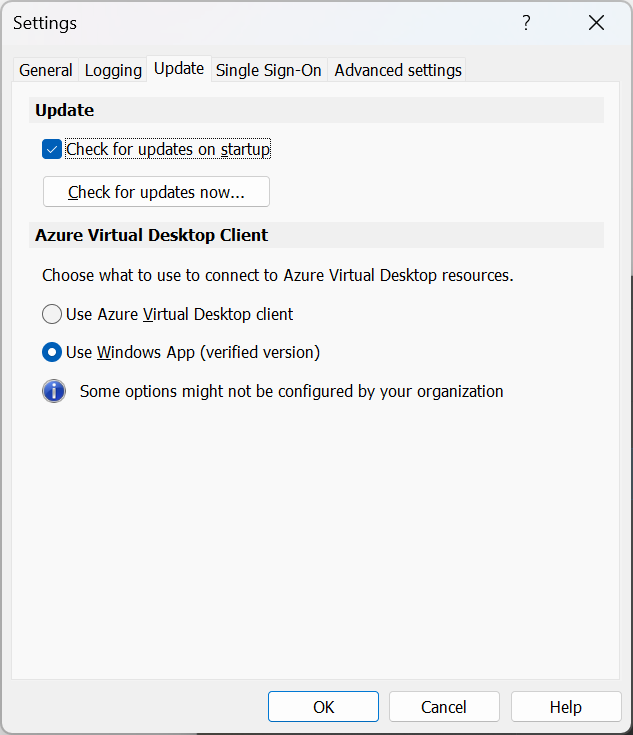
Completing these steps ensures your users remain able to access AVD resources after the Remote Desktop client reaches end of support.
Additional Information
For detailed configuration instructions, refer to the Windows App configuration section of the Parallels RAS Administrator Guide.
Was this article helpful?
Tell us how we can improve it.