
While using Parallels Desktop v21.1 or later in conjunction with the November Windows 11 update—you may experience issues running QuickBooks Desktop that can be manifested as: infinite loading cycles, connectivity timeouts, or a total inability to initialize the application.
We're currently investigating the root cause of the issue that occurs under these conditions, but in the interim, please use the following workaround to run QuickBooks:
Update: Issue has been fixed in Parallels Desktop 26.2.1, please use check for updates to install the update.
Workaround:
Change the execution mode of the QuickBooks:
-
Right-click the QuickBooks icon and select Properties.
-
Navigate to the Compatibility tab.
-
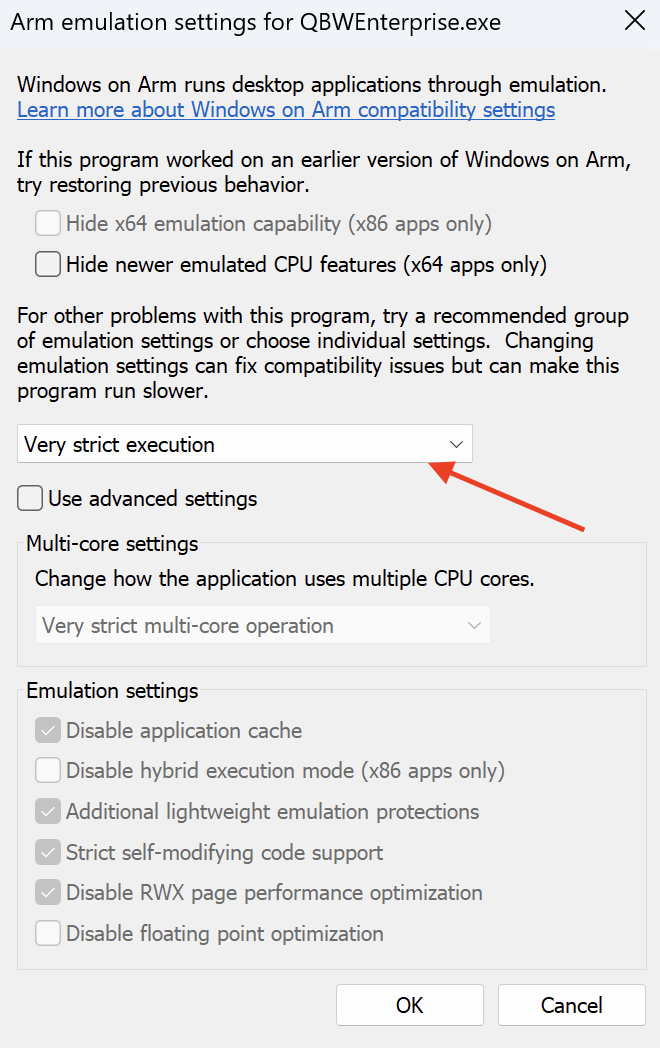
Click Change emulation settings.
-
In a dropdown menu, select Very strict execution, as shown here:
-
Restart your virtual machine to apply the changes.
-
Start QuickBooks application.
Alternative workaround:
If the above changes to the application execution mode were not sufficient, downgrade to v26.0 where the issue doesnt occur:
1. Shut down the Virtual Machine. Make sure that the virtual machine is shut down. If it is in a suspended state, please run it and then shut down (Actions > Shut Down).
2. In the Mac menu bar, click Parallels Desktop icon -> select “Quit”.
3. Download Parallels Desktop v26.0.1
4. Double-click on the downloaded file and press “Install”.
Note: Decline offers to run newer versions during installation, by either closing the window or clicking Cancel
5. Finish the installation and check if the issue can be reproduced.
Note: You can disable automatic update checks in: Parallels Desktop Preferences -> General -> untick "check for updates automatically"
Was this article helpful?
Tell us how we can improve it.