
Symptoms
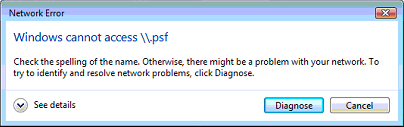
When attempting to reach shared folders or the user profile folder (My Documents, My Music, etc.) within the Windows guest OS (Virtual Machine), the following error message appears:
Windows cannot access \\.psf
Cause
This issue usually arises when you upgrade guest Windows XP to Vista, or Vista to Windows 7. Network links to Shared Folders in this case breaks down. Simple Parallels Tools reinstallation will not help.
Resolution
-
Start Parallels Desktop. Do not start your Virtual Machine or shut it down if it is running.
-
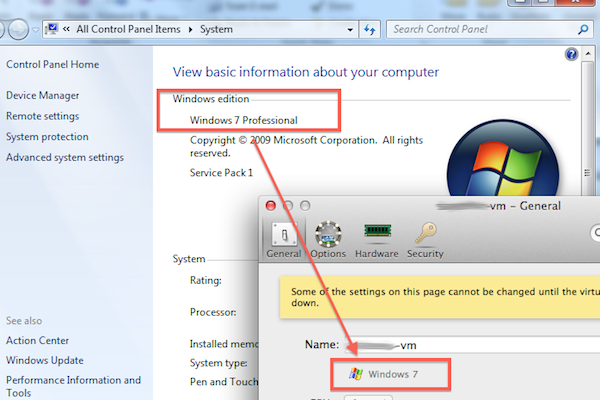
Open your Virtual Machine's Configuration -> General. Make sure that the type of the Virtual Machine matches the type of guest OS installed.
For example you have installed (or upgraded to) Windows 7 Professional. The type of your Virtual Machine should be set to "Windows 7" as well
-
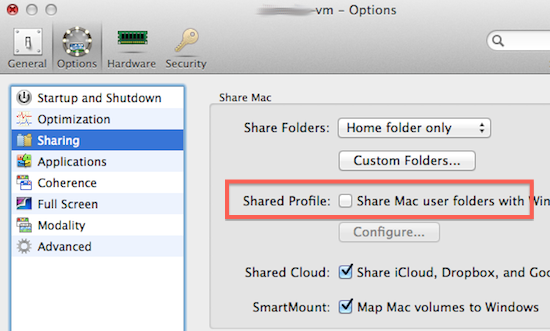
Go to your Virtual Machine's Configuration -> Options -> Sharing and turn off (uncheck) Shared Profile feature.
-
Start your Virtual Machine, go to Start -> Control Panel > Programs and Features and remove Parallels Tools.

-
Once Parallels Tools are removed, reboot Windows and install Parallels Tools back.
- Go to your Virtual Machine's Configuration -> Options -> Sharing and Enable Shared Profile.
Related articles:
-
Error 1606 could not access network location .psf/home/desktop
- Parallels Tools features stopped working after Windows 8 upgrade: \psf\Home\Desktop
Was this article helpful?
Tell us how we can improve it.