Resolution
In order to receive technical support for Parallels Desktop/Parallels Workstation support (email, phone and chat) please be sure that you registered your Parallels Desktop/Parallels Workstation activation key.Please check this KB article for information about key registration: http://kb.parallels.com/en/6116
You can receive free Parallels Desktop/Parallels Workstation email and chat support during 30 days after Parallels Desktop/Parallels Workstation key registration and free phone support 14 days after Parallels Desktop/Parallels Workstation key registration. To check your product registration date please login to “My account” at www.parallels.com - > “My registered products”.
NOTE: All new Parallels Desktop 5.0 for Mac customers as well as customers who have upgraded to Parallels Desktop 5.0 for Mac will be entitled to free 18 months Installation and Upgrade Email Support.
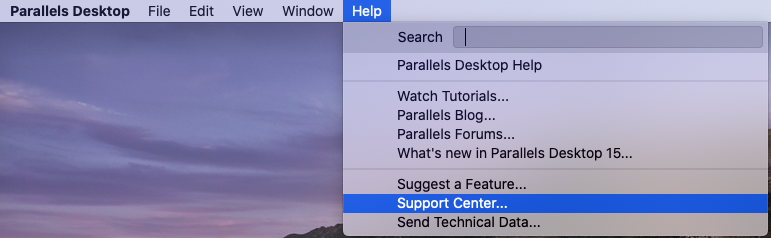
How to create ticket to Parallels Desktop/Parallels Workstation Technical support
To create a trouble ticket to Technical support team please use Support code that you can find in your account at Parallels Web site after Parallels Desktop/Parallels Workstation key or support order ID registration. It will be availible in your RT account as well. You can login to your account after your first support ticket creation here : https://support.parallels.com/
If you registered Parallels Desktop/Parallels Workstation key more than 30 days ago you should purchase Parallels Desktop/Parallels Workstation email or phone support here:
http://www.parallels.com/store/support/
- Parallels Desktop per incident support
- 3 or 5 incidents pack
Parallels Desktop/Parallels Workstation phone support
If you purchase Parallels Desktop/Parallels Workstation phone support, you will receive 9-digit order reference number. Please register this order ID in your account - > My support options. After that you will be able call Technical support team with your Parallels support code.
Parallels Desktop/Parallels Workstation online chat
If you purchase Parallels Desktop/Parallels Workstation Chat support or Parallels 3 or 5 incidents pack or you will receive 9-digit order ID. Please register this order ID in your account - > My support options. After that you will be able to contact Technical support team via Online Chat with your Parallels support code.Please also check our incidents deducting policy here: http://www.parallels.com/support/policy/