
Support eligibility
If you have a permanent license for Parallels Desktop for Mac, you are eligible for phone and chat support for 30 days after the license registration and email support for 24 months from the Parallels Desktop version release date. Visit KB 123560 to check free email support availability for your version.
If you have a subscription for Parallels Desktop for Mac, you are eligible for phone, chat and email support for the subscription lifetime.
How to get support
Click on the Parallels Desktop icon go to top Mac menubar -> choose Help menu > Support Center.
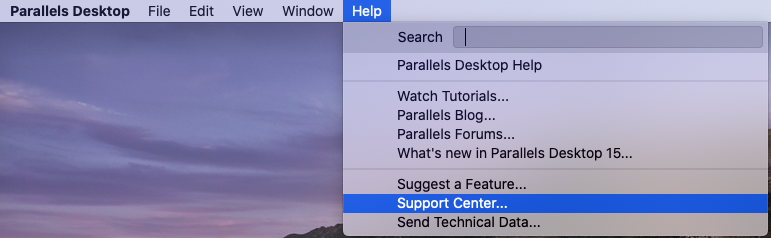
Or:
- Sign in to your Parallels account. Make sure your Parallels Desktop license is registered.
- Go to the Support page.
- Select your product and the category of your question. Enter a short issue description or key words into the search box.
- If you don't find the solution you are looking for, click Request Support and proceed to the Support contact options.
Note: Parallels Desktop support is only provided in English.
Was this article helpful?
Tell us how we can improve it.