Search Type:
Search for:

Language:

Product:
Category:
No categories for selected product

How to check the version and build number of Parallels Desktop?

Article ID: 4923 
Last Review: Oct,6 2008
Author:
Last updated by: system

Resolution

To check the current build number, please do the following:


1. Start Parallels Desktop for Mac.


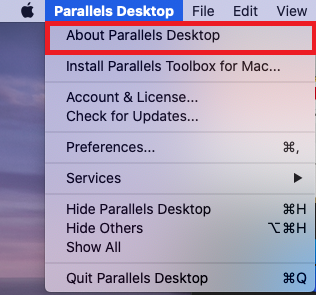
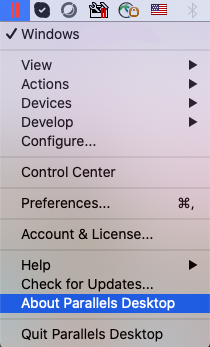
2. From the Parallels Desktop menu, choose the About Parallels Desktop option.


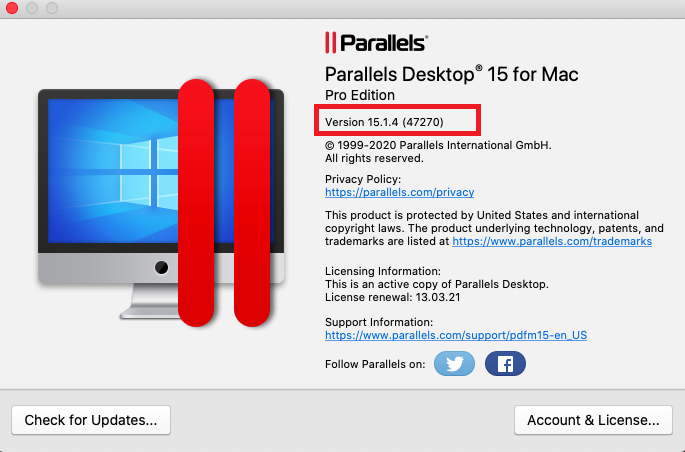
3. The About Parallels Desktop window displays the build number and Parallels version.


You can always find The latest Parallels build at http://www.parallels.com/en/download/desktop/


The latest Parallels builds are 3214 (version 2.5) and 3224 (version 2.5 for Leopard users) and build 5584 (version 3.0).

Keywords: build, number


Subscription for changes to this article Subscription for changes to this article

Please provide feedback on this article

Did this article help you solve your issue?
Yes
No
Partially
I do not know yet
 
Strongly Agree   Strongly Disagree
  9 8 7 6 5 4 3 2 1
The article is easy to understand
The article is accurate
Additional Comments:
*Please provide us with your email address in case we need to contact you.
* - required fields


For Home
For Business
For Hosters
For SaaS
For Developers
 
Desktop Virtualization
- Parallels Desktop Switch to Mac Edition
- Parallels Desktop for Mac
- Parallels Desktop 4 for Windows & Linux
- Parallels Workstation Extreme
- Parallels Solution for Windows 7
Server Virtualization
- Parallels Server for Mac
- Parallels Server 4 Bare Metal
- Parallels Virtuozzo Containers
Automation
- Parallels Operations Automation
- Parallels Business Automation
- Parallels Virtual Automation
- Parallels Plesk Panel Suite
More Products