
Symptoms
Mouse cursor does not automatically get captured when moving over virtual machine window.
Cause
One of the probable reasons for this problem is that the Smart Mouse option is set to "Optimize for games". It is the very feature that determines, whether mouse pointer is hovering over Virtual Machine window and automatically switches, if necessary, the area of its operation.
Resolution
-
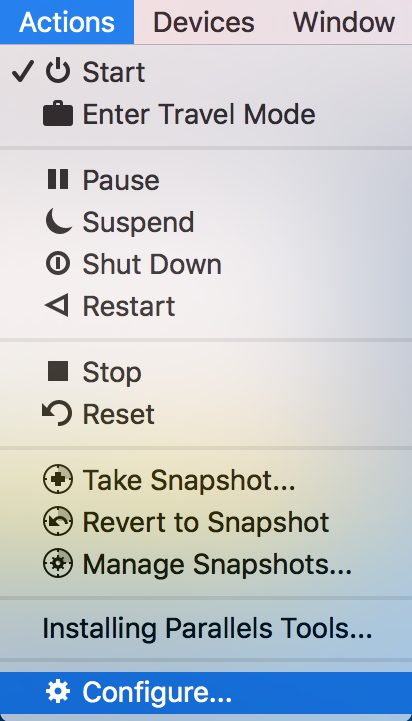
Click on Actions in the top menu bar > Configure...
-
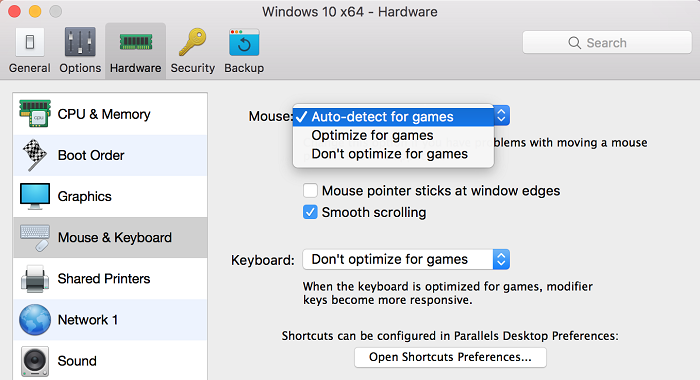
Go to Hardware > Mouse & Keyboard
Set Smart Mouse option to "Auto-detect for games" or "Don't optimize for games"
If the issue persists then follow the below mentioned steps.
-
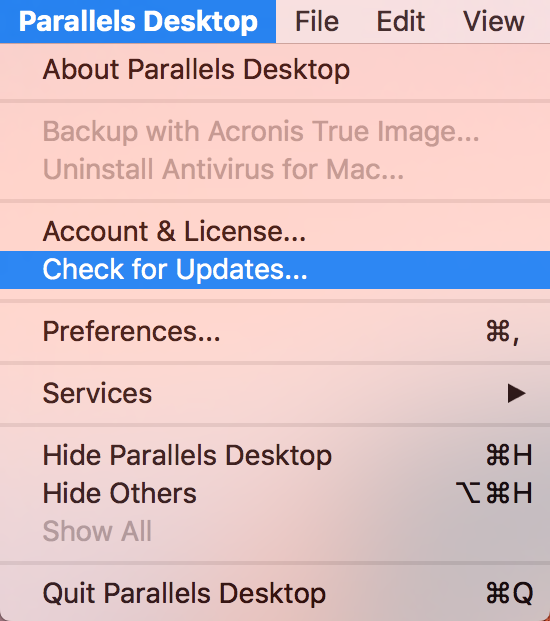
Please update Parallels Desktop to the latest build:
From the top menu bar, go to the Parallels Desktop menu, click Check for Updates.
-
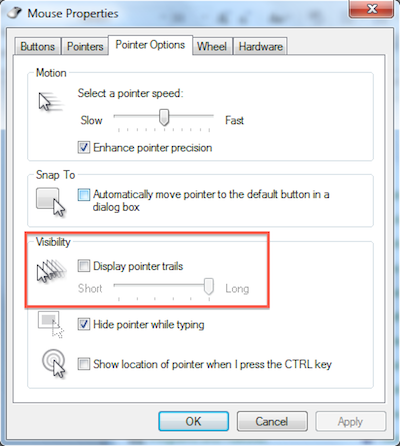
In Windows go to Start > Control Panel > Mouse > Pointers tab/Pointer Options tab.
Make sure standard Windows scheme is set.

Make sure Display pointer trail is not enabled.
- For more mouse troubleshooting instructions please visit KB 115306
Was this article helpful?
Tell us how we can improve it.